


New Haven Elementary Technology
mrsprusik.com
  • DK-K WK31
    • DK-K WK30
  • G1 WK31
    • G1 WK30 >
      • G1 WK29 >
        • G1 WK28 >
          • G1 WK27
  • G2 WK31
    • G2 WK30 >
      • G2 WK29
      • G2 WK27
      • G2 WK28
  • G3 WK31
    • G3 WK30 >
      • G3 WK29
      • G3 WK28
      • G3 WK26
  • G4 WK31
    • G4 WK30
  • G5 WK31
    • G5 WK30
  • Holidays
    • October Holiday Games
    • November Holiday Games
    • December Holiday Games
    • January Holiday Games
    • February Holiday Games
    • March Holiday Games
    • April Holiday Games
    • May Holiday Games
    • June Holiday Games
  • Virtual Field Trips
  • Bookshelves
    • September Bookshelf
    • November Bookshelf
    • October Bookshelf
    • January Bookshelf
    • February Bookshelf
    • March Bookshelf
    • April Bookshelf
    • May Bookshelf
    • June Bookshelf
  • Videos
  • TECH Day Fun
  • Lab Rules
  • Coding
  • Internet Safety
  • Coding
  • Keyboarding
  • Reading & Word Games
  • Math
  • Fun
  • G3 WK27
  • Mouse Practice
  • Vocabulary
  • Keyboarding
  • Internet Safety
  • Coding
  • Reading & Word Games
  • Math
  • K5Tech
  • Fun
  • Keyboarding
  • Keyboard Shortcuts
  • Internet Safety
  • Coding
  • Reading & Word Games
  • Writing
  • Google Documents & Google Slides
  • Keyboarding
  • Vocabulary
  • Internet Safety
  • Coding
  • Google Classroom
  • Reading & Word Games
  • Social Studies
  • Keyboarding
  • Vocabulary
  • Internet Safety
  • Coding
  • Google Classroom
  • Reading & Word Games
  • Math Games
  • K5Tech
  • Gym, Art, Music
Picture
Picture
Picture
Picture


Picture
                                       Learning Target: 
  • Students will demonstrate  respect for technology equipment
  • Students will demonstrate understanding of coding using code.org
  • Students will demonstrate and use vocabulary for coding using code.org
  • Students will demonstrate problem solving using code.org
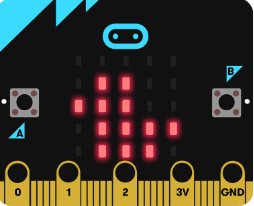
  • Students will demonstrate understanding of micro-bits, downloading code ​​
Picture
 Activities 
​Week of May 28
​​​1. Click on the C login into Clever and go to
​CODE.ORG continue Course E
Start where you left off last week
2.  Hit on the Micro - bit button and complete the code of your choice 


​


1. Code.org​
                                                                                          Code Vocabulary

Algorithm
 – A series of instructions on how to accomplish a task.
Coding – Transforming actions into a symbolic language.
Debugging – Finding and fixing issues in code.
Function – A piece of code that can be called over and over.
Parameters – Extra bits of information that you can pass into a function to customize it
Loop – The action of doing something over and over again. 
Variable – A placeholder for a piece of information that can change. 
Command – An instruction for the computer. Many commands put together make up algorithms and computer programs. 
Picture
Step 1: Click here to Login to Clever
Picture
Step 2: Login with Google
Picture
Step 3: Once in Clever click on Code.org Green dots mean you are done with that level
2. Micro-Bit 
​
Micro-bit

Permission Only for Links below
(All work is done, Substitutes)
Picture
Picture
Micro-bit
ABCya
When Work is Done
Word Search Technology Vocabulary
  • ​

Proudly powered by Weebly